
Acorns: Save & Invest Money
AcornsFinance
4.777.83K Reviews
- Version
- 4.207.0
- Installs
- 10.00M
- Age Rating
- Everyone
Screenshots

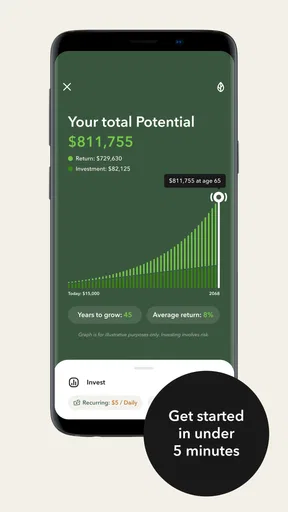
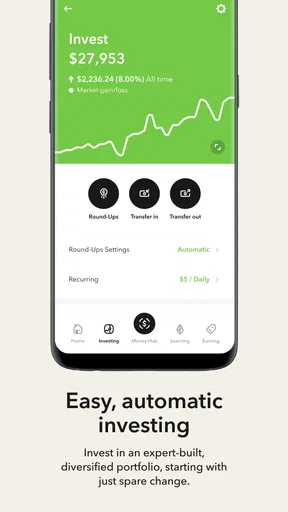
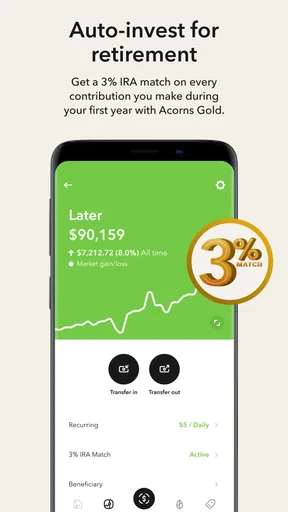
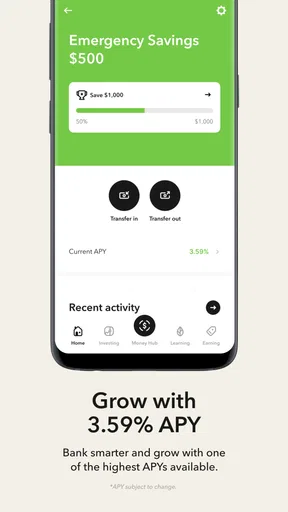
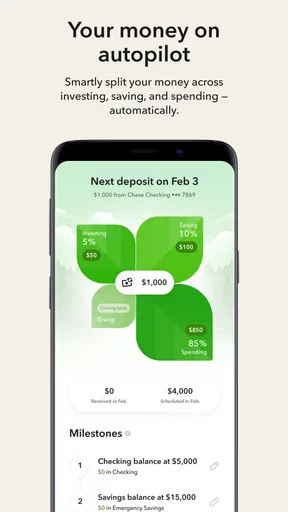

Our Review of Acorns: Save & Invest Money
 Analysis by Appyee
I spent time with Acorns as a simple finance app built around investing in stocks and exchange-traded funds. Its main appeal is not that it turns investing into a full research terminal; it is that it tries to make a regular investing habit feel less intimidating. I found the experience most useful when I treated it as a background system for long-term money goals rather than as a place to make frequent trading decisions.
The app is developed by Acorns and is available free of charge. That wording matters: free access makes it easy to install and explore, but it does not automatically mean every possible service or account experience has no cost. I would read the current terms shown inside the app carefully before moving money, especially if fees, account conditions, or optional services affect the value for your situation.
It has been available since October 7, 2014, and its broad audience is reflected in its Everyone content rating. On Android, the current version is 4.207.0 and requires Android 10 or later. The app has reached over ten million installs, with an average rating of 4.7 from around 407 thousand ratings and roughly 78 thousand written reviews. Those figures suggest that the basic idea has connected with many people, although popularity should not replace checking whether its approach fits your financial habits.
How the investing experience feels in everyday use
The first thing I noticed is how different this feels from opening a conventional brokerage platform. A traditional broker usually puts market prices, order types, charts, watchlists, and research in front of you. Acorns takes a more guided route. Its emphasis is on building financial wellness through a smart investing plan, so the experience is better suited to someone who wants structure than to someone who wants to control every detail of a portfolio.
That distinction is important before signing up. If you enjoy comparing individual companies, timing entries, and adjusting positions manually, the app may feel deliberately limited. If you tend to postpone investing because the process seems complicated, its simpler presentation can remove some of that friction. I would describe it as a habit-building tool with an investing component, not a replacement for a serious trading workstation.
A realistic use case is a person who receives income regularly but rarely sets aside money for the future. Instead of waiting for a large amount to appear in a savings account, that person can use the app as a prompt to establish a repeatable investing routine. The benefit is behavioral: a small, consistent action can be easier to maintain than a dramatic financial resolution made once a year.
Another useful scenario is someone who already has a workplace retirement plan but wants a separate, flexible investing habit for a medium- or long-term goal. Acorns can make sense as an additional layer, provided the user understands the difference between an investment account and cash that may be needed soon. Money for rent, emergency expenses, or an imminent purchase should not be treated like money that can comfortably remain exposed to market movement.
A guided plan is helpful, but it is not personal financial advice
The phrase “smart investing plan” can sound more personalized than it really is. A guided setup can help organize choices, but it does not know every detail of your life, including unstable income, debt, tax circumstances, or upcoming obligations. I would use the recommendations as a starting point and then ask whether the suggested approach matches my own time horizon and ability to tolerate losses.
This is one of the app’s less obvious trade-offs. Simplicity can protect beginners from making impulsive decisions, yet it can also hide the reasoning behind a choice. Before accepting a plan, I would look at what the selected portfolio is intended to do, how broadly it is invested, and how comfortable I would be seeing its value fall during a difficult market period. A clean screen should not be mistaken for a risk-free result.
The stock and ETF focus is also worth understanding. Exchange-traded funds can provide broad exposure through a single investment, but they still fluctuate and can contain different types of assets. A portfolio built from funds is not the same as a guaranteed savings balance. The app may make investing feel approachable, but the underlying financial reality remains: returns are uncertain, and losses are possible.
Where the free price helps, and where careful reading matters
Because the app itself is free to download, it is easy to try without paying an upfront purchase price. That is a genuine advantage for a curious beginner who wants to inspect the interface before deciding whether it belongs in a wider money plan. It also lowers the barrier for someone who has never used an investing service and wants a less intimidating first look.
Still, I would not evaluate the service solely by the word “free.” In finance, the meaningful question is what it costs to use the account or optional services over time. The app’s free availability tells you that installation does not require a purchase; it does not, by itself, establish that all investing activity, account features, or related services are free. I would review the pricing information presented during enrollment and revisit it if I add anything beyond the basic experience.
This is especially important for smaller balances. A charge that seems minor on a larger portfolio can take a more noticeable share from a modest one. For a new investor contributing limited amounts, comparing the full cost structure with a low-cost brokerage or a retirement account provider may be more valuable than comparing colorful interfaces.
I also recommend separating three questions: Can I access the app without paying for a download? What account or service am I actually opening? And what ongoing costs apply to that choice? Keeping those questions separate prevents the common mistake of treating free installation as a complete answer about investment value.
What I found useful beyond the obvious pitch
One practical strength is the way the app can serve as a behavioral checkpoint. I would open it not to search for the next exciting stock, but to ask whether my contributions still match my goal. That small change in mindset matters. It turns the app from a novelty into a routine review of whether I am investing deliberately or simply reacting to market headlines.
A second insight is that automation only helps when the surrounding cash flow is stable enough to support it. Someone with irregular income should not blindly choose an amount and forget about it. I would schedule a regular review after major changes such as a new job, a large bill, or a shift in household responsibilities. The best plan is one that can survive ordinary life without forcing withdrawals at an inconvenient time.
A third trade-off concerns control. A beginner may benefit from not having dozens of decisions to make, while an experienced investor may see that same restraint as a disadvantage. Before moving an existing portfolio, I would compare the investments available through the app with the exact exposure I already want. Convenience is valuable, but it should not make me abandon a carefully designed strategy without a good reason.
A fourth useful habit is to treat the app’s balance as one part of a broader financial picture. I would keep emergency savings, debt payments, retirement contributions, and taxable investing in separate mental categories. Seeing an attractive investment balance can create a false sense of progress if high-interest debt or a lack of cash reserves is being ignored. Acorns can support a plan; it cannot make an incomplete plan complete.
How it compares with familiar alternatives
Compared with a standard brokerage app, Acorns is more approachable but generally less appealing to someone who wants detailed control. A broker is usually the better fit for researching securities, choosing exact orders, or managing a portfolio with deliberate allocations. Acorns is more convincing when the main obstacle is getting started and staying consistent.
Compared with a bank savings account, the app offers a different purpose rather than a direct upgrade. Cash savings are designed for accessibility and stability, while stock and ETF investing is intended for money that can tolerate market movement. I would not substitute one for the other simply because an investing app feels more productive. The right choice depends on when the money will be needed and how much uncertainty I can accept.
Compared with a retirement-focused provider, Acorns may feel more flexible and beginner-friendly, but a retirement account can be more appropriate when the goal is specifically long-term retirement saving and its tax treatment matters. I would compare account types, access rules, and total costs before deciding where recurring contributions belong. The easiest interface is not automatically the most suitable home for every dollar.
There is also a psychological difference from choosing investments independently. With a self-directed service, I am responsible for every selection and every change. With a guided product, I surrender some control in exchange for convenience. Neither approach is universally superior. The important question is whether I am more likely to follow a simple plan or to become overwhelmed by too many options.
Who is likely to get real value from it
I think the strongest audience is a new investor who wants exposure to stocks and ETFs but does not yet feel ready to manage a complex portfolio. It can also suit someone who understands the basics but needs a gentle nudge to turn good intentions into a regular routine. The free download and Everyone rating make the first step feel accessible, while the guided focus keeps the experience from becoming a maze of technical controls.
It may be useful for a busy worker who wants to check progress occasionally instead of following financial news throughout the day. It can also help a person who has already built emergency savings and wants to add a separate long-term investing habit without making daily decisions. In both cases, the value comes from consistency and clarity, not from discovering a secret way to outperform the market.
I would be more cautious if the user has expensive debt, no emergency reserve, or a near-term need for the money. I would also hesitate to recommend it as the only financial tool for someone with complicated tax needs, a highly specific asset allocation, or a strong desire to select individual securities. Those users may receive better value from professional advice or a brokerage with more direct control.
Someone who is highly sensitive to seeing an account balance decline should also pause before investing. A friendly interface can soften the presentation, but it cannot remove market risk. I would rather see a user choose a suitable cash or savings solution than invest money they may need soon just because the app makes the process feel easy.
Questions I would settle before moving money
The first question is whether the investment goal is long term enough for stocks and ETFs. If the answer is no, I would keep looking at safer and more accessible options. The second is whether the contribution plan remains comfortable after accounting for bills, debt, and emergency savings. A contribution that looks manageable on a good month can become stressful when circumstances change.
The third question is how much control I actually want. If I want to choose individual securities, set detailed allocations, or execute specific trades, I would compare a traditional brokerage instead. If I mainly want a guided route and fewer decisions, Acorns has a clearer case.
The fourth question is total cost rather than download cost. I would inspect the current account and service pricing before enrolling, then consider how those charges interact with my balance and contribution size. This step is essential because a free app can still lead to paid financial services, and the value depends on the complete arrangement.
The final question is whether I will review the plan occasionally. “Set and forget” sounds convenient, but life changes. I would check that the goal, contribution level, and risk comfort still make sense after major personal or financial changes. Automation should reduce routine effort, not eliminate responsibility.
My verdict on whether to try it
My overall view is positive, with a clear boundary. Acorns is a strong starting point for people who want a simple, guided way to build an investing habit around stocks and ETFs. Its free availability, approachable design, and emphasis on a smart plan make it easier to begin than many feature-heavy alternatives. I can see why it has attracted a large user base and a 4.7 average rating.
The best value here is behavioral simplicity, not guaranteed financial performance. If the app helps me contribute consistently, understand my chosen approach, and keep investing separate from short-term cash needs, it can earn a useful place in my financial routine. If I am expecting precise trading tools, personalized advice, or a completely cost-free account experience simply because the download is free, I would be disappointed.
I would try it if I were new to investing, comfortable with a guided portfolio, and willing to read the current terms before committing money. I would skip it, or at least compare alternatives first, if I needed advanced control, specialized retirement planning, or immediate access to my funds. In short, I recommend it as an accessible on-ramp for long-term investing, but not as a universal replacement for savings, retirement planning, or a full-service brokerage.
Verdict
Strengths of Acorns: Save & Invest Money
- Automatic round-ups make saving effortless.
- Recurring investments help build consistent financial habits.
- Simple interface suits beginners with little investing experience.
- Educational content explains basic investing concepts clearly.
- Retirement and custodial account options support different goals.
Limitations of Acorns: Save & Invest Money
- Monthly fees can outweigh returns on small account balances.
- Investment choices are limited compared with full-service brokerages.
- Some features require higher-tier subscription plans.
- Transfers and withdrawals may take several business days.
- Availability and account options depend on U.S. residency.
Similar Picks in This Category
View All
Google Wallet
Google LLC4.3

Airtel: Recharge, Bank & Loans
Airtel4.0

PayPal - Pay, Send, Save
PayPal Mobile4.2

DANA Indonesia Digital Wallet
PT Espay Debit Indonesia Koe4.5

Binance: Buy Bitcoin & Crypto
Binance Inc.4.8

Cash App
Block, Inc.4.7
Frequently Asked Questions
What is Acorns: Save & Invest Money, and how does it work?
Acorns is a personal finance app designed to help users save and invest with relatively little effort. Its main feature can round up eligible purchases and invest the spare change, while users can also make recurring deposits or one-time contributions. The app generally invests money in diversified portfolios based on your selected risk level rather than letting you choose individual stocks freely.
Is Acorns suitable for beginners who have never invested before?
Acorns is primarily aimed at beginners because it simplifies several decisions that can make investing feel intimidating. During setup, the app asks about goals, time horizon, and risk tolerance, then suggests a portfolio made up of diversified investments. It also provides educational content and account views that make progress easier to follow, although users should still understand that investments can lose value.
How much does Acorns cost, and are there any additional fees?
Acorns uses subscription-based pricing, so the cost depends on the plan available in your region and the features included. Plans may cover investing, retirement accounts, checking-related tools, or family features, but pricing and benefits can change over time. Before subscribing, review the current fee schedule carefully and check whether investment expenses or other account-related charges apply.
Can I withdraw my money from Acorns whenever I want?
Money in a standard taxable investment account can generally be withdrawn by requesting a transfer to a linked bank account, but the process may take several business days. The amount you receive can also change with market prices, and selling investments may have tax consequences. Retirement accounts have additional rules and potential penalties, so they should not be treated like ordinary savings accounts.
Is Acorns safe to use, and what should I know before opening an account?
Acorns uses security measures such as encrypted connections, account authentication, and identity verification to help protect user information. However, no financial service is completely free from security or investment risk. Brokerage protections may apply to eligible assets if the provider fails, but they do not protect against normal market losses. Confirm account eligibility, privacy terms, fees, and investment risks before signing up.
